Not all LinkedIn engagement is equal.
Some posts grow your audience. Others deepen your connection with people already paying attention.
It's easy to treat them the same, when they're not.
I used Apify to pull the data from my last 50 posts and Claude Cowork to analyse them and scrape my LinkedIn account. Combining both the data and a visual analysis.
It took about 30 minutes and here's what the numbers showed.
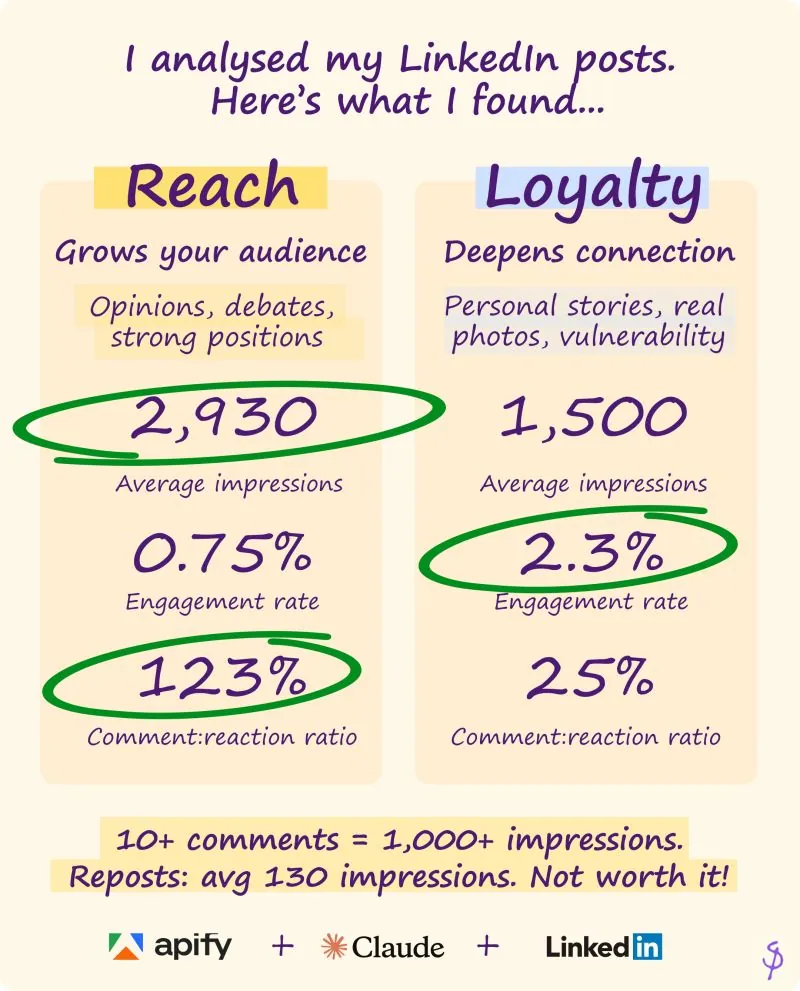
Reach posts: opinions, debates, strong positions.
- Averaged 2,930 impressions.
- They got more comments than reactions.
- 123% comment-to-reaction ratio.
- People don't just like these posts, they argue with them.
- Unsurprisingly the algorithm likes that.
- Opinion posts get a lot more 💡 reactions.
Loyalty posts: personal stories, real photos, vulnerability.
- 3-5x the engagement rate.
- Fewer people saw them, but the ones who did really connected.
- The comment-to-reaction ratio? Just 25%.
- People feel something, but they don't need to debate it.
- They hit ❤️ or 👍 and move on.
A few other things:
Posts with 10+ comments broke 1,000 impressions. Every time. 20+ comments ended up with over 3,000 impressions.
Reposts averaged 130 impressions. Reshares with added commentary weren't much better - 3x fewer reactions and 9x fewer comments than originals.
Posts with images got 3x more engagement than text-only.
When you post matters too, although this is limited data:
- Monday is my best day for comments 8.2 avg vs 3.4 on Wednesday
- 9am is my default but late afternoon posts got nearly 2x the comments
The theory? People scrolling at end-of-day are more likely to stop and debate. Morning scrollers react and move on.
I caveat with the fact this is a relatively small sample. But if you're writing for comments (reach), time of day might matter more than you think.
If you want to analyse your posts like I did, NO need to comment "Posts" or anything silly like that, just follow these steps (or ask me to run it for you):
-
Get a Claude Pro account and install Claude Cowork. Add the Chrome extension and ask Claude to go through your LinkedIn posts, analysing performance by post type using impressions, comments and reactions. While this is running...
-
Use Apify to export your LinkedIn posts as raw data - it pulls the engagement data into a structured format in minutes. I used the "Profile Posts Scraper for LinkedIn [No Cookies]" actor.
-
Once Claude Cowork has finished running and drawn initial conclusions, paste in the output from the Apify scrape, and ask it to use this to sense check and analyse its findings.
Would love to hear what patterns you have noticed in your own content?
First published on LinkedIn.


